THING ON A SPRING
Dean Lester reveals how he wrote the arcade game Ziggy
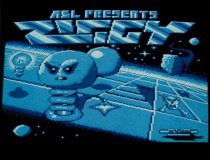
ZIGGY is a three dimensional arcade-adventure I wrote for Audiogenic. It involves guiding Ziggy - a Zebedee-like character around his strange world, collecting pyramids to enable him to travel upwards to eventually free his ladyfriend.
The many hazards he meets along the way include skulls, glue, sliding cubes and bouncing balls. Also included with the game is a screen designer to enable you to redesign his world to your own specifications.
I have always enjoyed the arcade-adventure style of game - which involves more thinking than just a shoot-'em-up - but with attractive graphics, unlike a text-only adventure.
In particular I was attracted to the style of game which is seemingly found exclusively on other machines.
These involve high resolution graphics with intricate detail, observed at an oblique angle, with sprites moving in true three dimensions behind and in front of other game objects.
Moving around the game usually involves connecting rooms of some description, with the room display switching rapidly as doors are passed through. This then was to be the style of my game. The characters them-selves developed as the programming progressed.
I have an Electron with a Cumana disc system and did all the main programming on this. I borrowed a BBC Micro and a Master to write versions for these machines.
The entire program was to be in machine code, so that pages 4, 5, 6 and 7 of memory (normally owned exclusively by Basic) could be used by the game.
The reference books I used were the standard Electron User Guide, the Advanced User Guide, a book on assembly language and the equivalent BBC Micro and Master manuals.
The Mode
The first decision to make was which mode to use. I was determined the resolution was to be very good and this left me with the choice of Modes 0, 1 or 4.
Mode 0 is almost never used by games programmers since although the resolution and detail is superb, it gives only two colours and gobbles up 20k in the process.
This left either Mode 1 or 4. Mode 1 would allow four colours, but again it is a 20k mode and somewhat slow for an Electron game. So Mode 4 it was to be.
The first programming job was to write the main game routine. This is the part of the program which calls all the subroutines, although it does very little in itself. That done, the subroutines were next.
The first routine I wanted to write was the screen layout. The screens consist of 6 x 7 blocks, as this fitted nicely on the Mode 4 screen.
Each block can be one of 16 - blank, a movement arrow (four of these), glue, energy bulb, magic wands, down escalator, up escalator, skull and crossbones, a pyramid, cube start square (two of these) or a ball start square (two of these also).
A byte can hold any number between zero and 255, and this can also be expressed as two numbers between zero and 15, one in the top half of the byte (or nibble) and one in the bottom.
By masking off the nibble I didn't want, it was possible to store two blocks in one byte - that is one screen in 21 bytes and the entire 200 screens in only 4200 bytes.
The screen routine reads the correct nibble from the screen data table, selects the corresponding block from the sprite area of memory and draws it on the screen.
This process is repeated for all 42 blocks, starting from the furthest from the observer, so that the perspective is correct. At the same time the data is expanded into another area of memory so it is easy to read which square Ziggy is on at any one time.
Sprites
The next subroutine was the sprite routine. A common way of drawing sprites is to Exclusively OR (EOR) the sprite with the background.
This has the advantages of speed and ease, since when the sprite comes to be deleted again all that has to be done is for the sprite to be redrawn. It cancels itself out (1 FOR 1 is 0) and any background which was overwritten is restored.
However, its main disadvantage is that the sprite itself becomes corrupted by any background and can then become difficult to see. So I had to develop a method whereby the sprite was unaffected, but the background was not destroyed.
I also wanted to make the sprites as real as possible, with the ability to see through holes in the body of the sprite. This tall order was eventually solved by one routine.
The procedure first stores the background about to be overwritten in non-screen ram. It then logically ANDs the screen with a sprite mask (a sort of cut-out of the margins of the sprite). This effectively punches a hole in the screen in the shape of the sprite. The result is then ORed with the sprite itself, fitting it into the hole.
To delete the sprite, you just replace the background (stored earlier) back where it belongs.
The routine works rather well - in the game, Ziggy is not affected by the background, has a nice clear margin around him and you can see through the coils of his spring to the background behind.
3D movement
The next job - theoretically the hardest since I didn't know how to do it - was to allow the game characters to move in 3D relative to each other. That is, the nearer sprites in front of the further ones and so on.
I decided that the way to do it was to sort the sprite positions into distance priority. Each sprite has a small data table associated with it, containing information on position, direction of motion, which character it is and so on.
The position data has x,y and also z values, since the character may be a certain distance off the ground.
By sorting the sprites into distance order - also taking into account the height then drawing the furthest first, then the next furthest and so on, the nearer characters will overlay the further ones giving the effect of perspective.
The characters are deleted in reverse order as their stored backgrounds may contain some data from other sprites which have already been erased. The pleasure from seeing the routine work first time was indescribable!
Next was to design the characters themselves. I wrote a small sprite designer program and then spent many evenings trying to get them pixel-perfect.
By stippling the sprite masks, I managed to give the characters shadows, which moved with them and gave a nice lighting effect to game area.
Having done most of the hard work, I then set about writing the smaller routines, such as reading Ziggy's position, reading the keys, setting out the meters and so on.
I was particularly pleased with the death routine Ziggy vapourises in convincing Star Trek style.
The menu and high score were next, and I also wrote an interrupt routine to give extra colour to the display, and to prevent the whole screen from disappearing when the palette is blanked as rooms are changed.
I am completely tone-deaf and I'm the first to admit it, but I wanted to include background music to jolly along the game. I therefore enlisted the help of several of my musically-enlightened friends, who between them came up with an assortment of weird and wonderful tunes.
I think the final piece included was a nice balance between being interesting without being too intrusive into the game. The music is interrupt driven, so it plays entirely independently of the game, and therefore does not alter its tempo when the processor has a lot to do.
An output-buffer empty event is enabled, so an interrupt is generated every time the last note being played has finished. The interrupt handling routine then gets the next note, plays it, and returns from the interrupt.
However, for all this, a music-off option was considered essential for those late night Ziggy sessions.
Screen designer
Next I wrote the screen designer, originally just for my own use for the game itself, but later smartened up and included with Ziggy to allow other people to design their own.
I spent many weeks dreaming-up seemingly impossible screens. My philosophy was that if I could complete the screen even if it was only once then it was possible and could be included.
Many of them require a bit of lateral-thinking before attempting, so put your brain in gear before engaging the fingers.
I have completed the game from start to finish three times (without using the cheat mode). It takes about one and a half hours, but I think it is well worth it to see what lies in store for Ziggy in room 200.
The game took about three months from conception to completion, working mainly evenings and weekends, since I am also a full-time (medical) student. Much of the equipment I have is borrowed from friends and my software company (ASL).
The Electron is my first computer, which I have had for about 18 months and Ziggy is my second game.
So it shows you do not need to be enormously experienced, rich or have loads of spare time to write marketable games. So you've no excuses - go on and have a try yourself, you could be pleasantly surprised.
Incidentally, if you do have
lots of free time, can program a Cray II with your eyes shut,
and are related to John Paul Getty I'm sure it helps.
This article appeared in the December 1987 edition of the "Electron User", published by Database Publications.
Scanned in by dllm@usa.net
http://www.stairwaytohell.com